December 31, 201114 yr They drained the fountain in 2005 to install freezing equipment for ice skating in the fountain... Carowinds, on the other hand, filled a hoola hoop! Not to Hijack the forum or anything, but 1 real quick question. Is the Freezing Equipment for the fountain still in place or was it removed after winterfest that year??
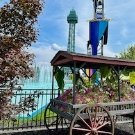
December 31, 201114 yr Invertigo's queue structure is at bottom left, as is an Action Zone light pole, so obviously 1999 or after. Not much else to go on though. I'ma say 2008.
December 31, 201114 yr The trees look like they are about the same height as this year. I guess 2011.
January 1, 201214 yr Me to, 2011. I don't see anything different then when I rode Congo Falls in the summer.
January 1, 201214 yr Author 2011! Good job! Topgun1993 has revived his excellent thread from last year...so I'm going to suspend this one...I look forward to seeing his posts every day, just like Standbyme's great thread. I thank everyone for participating, and hopefully I was able to somewhat entertain you in between those two excellent topics! Happy 2012!!
January 7, 201214 yr This was a fun thread KIfan73, thanks for the fun game. I hope it returns at some point!





Join the conversation
You can post now and register later. If you have an account, sign in now to post with your account.
Note: Your post will require moderator approval before it will be visible.