.jpg.9b5f96f35ce4c31a2765cab07c4a245e.jpg)
TheFloppyDisc
Members
-
Joined
-
Last visited
Everything posted by TheFloppyDisc
-
Intimidator 305 also has an 85 degree drop so it will tie it for the steepest drop. https://www.kingsdominion.com/play/rides/intimidator-305
-
Yeah I agree that this is the backbone footer. Also, the back bone is pretty tall so it would probably stick out more if it was already in place.
-
Three cranes are mentioned in the article, does this mean two more cranes are coming?
-
It is perpendicular to the camera so it is hard to see...
-
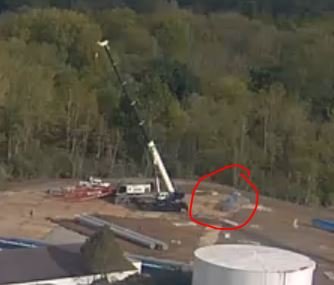
We have some sweet multi-tasking right now! Crane assembly + brake run staging
-
Crane pieces are starting to arrive!

-
I was thinking the same thing.
-
Looks like they are maybe adding another piece of the catwalk right now.
-
Maybe this has been answered already, but why does the large crane need to sit on a wood pad instead of just sitting on the gravel pad?
-
I saw it go back behind the lift hill and turn left about an hour ago so probably could be what @Rockfrog33 suggested.
-
Anybody have an idea what they are unloading from those trucks right now?
-
I went this past Friday and the lines weren't bad at all. I think the longest I had to wait was like 30-35 minutes. I didn't go to any of the haunted attractions though so I can't speak for those wait times.