evilemokid94
Members
-
Joined
-
Last visited
-
lmao, everyone says that but i opted for the v6 since its my first car and i was learning how to drive with it so i rebuilt the v6 so i have alittle more power but still a v6, but anywho i have a 383 lt1 sitting in my garage waiting for this summer when i can toss it in.
-
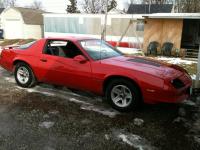
Hey Guys, yes the car in my picture is what I will be driving, it has a 2.8 v6 and I should get around 24 highway. Also iv already bought my tickets and my parking passes online I bought the 2 day tickets so those at out of the way. The only thing I need to get now are gas and food/drinks. And iv read that you can leave the park and come back but I will probably just eat inside the park, ie panda express or subway cause we love Chinese and subway.
-
hello all!!! iv been to Kings Island 3 times but all where when i was younger, well i have my license now and im wanting to go to Kings Island. my question is this, how much money should i bring for the day? i live 3 hours from Kings Island so im going to have to leave around 5 in the morning to be there when the gates open so im curious as to how much i should need for gas and for the day. im going to bring a cooler for the drive so i wont have to stop and get stuff to drink and im going to fill up my car before i head out, im also taking my girl so im going to have to supple for two. thank you guys!!! btw i love the site!!!!