Skip to content
View in the app

A better way to browse. Learn more.

Kings Island Central Forums

A full-screen app on your home screen with push notifications, badges and more.

To install this app on iOS and iPadOS
  1. Tap the Share icon in Safari
  2. Scroll the menu and tap Add to Home Screen.
  3. Tap Add in the top-right corner.
To install this app on Android
  1. Tap the 3-dot menu (⋮) in the top-right corner of the browser.
  2. Tap Add to Home screen or Install app.
  3. Confirm by tapping Install.

humblywalkin

New Member
  • Joined

  • Last visited

Everything posted by humblywalkin

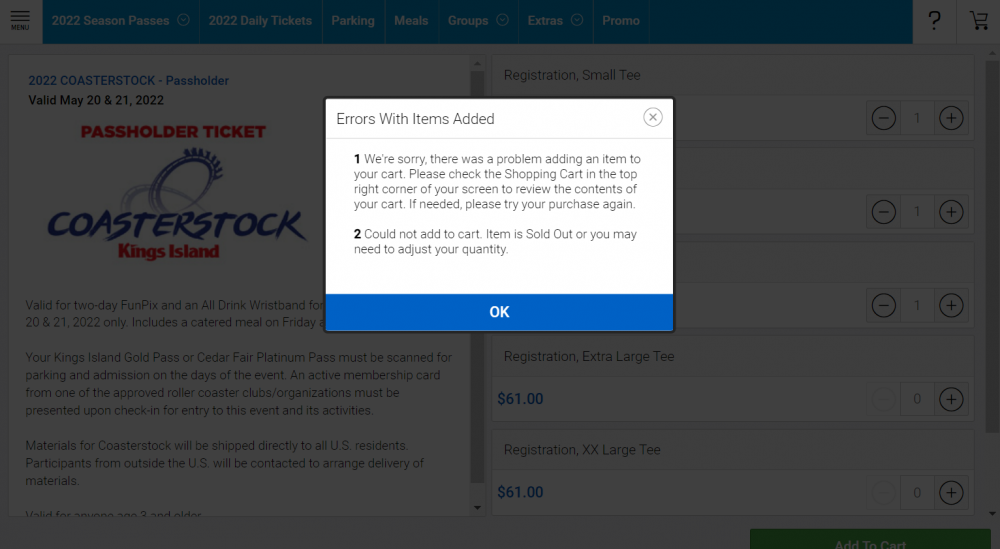
  1. I've had the tab open on my laptop for a month in anticipation of tickets going on sale. I started refreshing at 9:59 and the "On Sale Soon" button that had been there simply disappeared and was replaced with nothing:I continuously refreshed the website non-stop until the option to purchase appeared (a little after 10:10), but then got this message not matter what combination of t-shirts sizes I entered.We opted for platinum passes again this year because Coasterstock and Coastermania were the highlights of 2021 for our (now) 8th grader. I really don't have any idea what I should or could have done differently to procure tickets? Were other folks experiencing these sort of tech issues that prevented the purchase of tickets or was I the only one?
Background Picker

Account

Navigation

Search

Search

Configure browser push notifications

Chrome (Android)
  1. Tap the lock icon next to the address bar.
  2. Tap Permissions → Notifications.
  3. Adjust your preference.
Chrome (Desktop)
  1. Click the padlock icon in the address bar.
  2. Select Site settings.
  3. Find Notifications and adjust your preference.