

Skip to content
View in the app

A better way to browse. Learn more.

Kings Island Central Forums

A full-screen app on your home screen with push notifications, badges and more.

To install this app on iOS and iPadOS
  1. Tap the Share icon in Safari
  2. Scroll the menu and tap Add to Home Screen.
  3. Tap Add in the top-right corner.
To install this app on Android
  1. Tap the 3-dot menu (⋮) in the top-right corner of the browser.
  2. Tap Add to Home screen or Install app.
  3. Confirm by tapping Install.

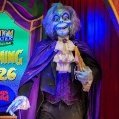
Phantom Theater: Maestro Walk Around Character
Featured Replies

Thought this was pretty rad. Was perusing Reddit and came across some stills and video of The Maestro walk around character in the park circa 1992.

9907EF65-1925-4DFF-8FAA-E5249677BD44.jpeg

C464826A-3FB1-4D1B-A9CB-B3A76A00EFC8.jpeg

C493269A-15B8-4E70-A9A7-56E546395D2C.jpeg

He makes a brief appearance here in the 20th Anniversary parade (as well as the KI Clown Band): 

The mask for the character eventually found it’s way into a Fearfest display in front of the Action Theater in 2005 (per the photo gallery): 

278EDC53-55F8-483E-8AA8-E469C47238A3.jpeg

Pretty cool stuff!!

What! No way! They should have him roaming around at haunt or something 

  • 2 weeks later...

That is awesome! I'm assuming this was to promote the ride, sad to say it was only for one year. If The Phantom Theater ever does return in ride form, I'd hope they would bring this back!

  • 2 weeks later...
On 4/27/2024 at 8:31 PM, kingsislandfan1972 said:

That is awesome! I'm assuming this was to promote the ride, sad to say it was only for one year. If The Phantom Theater ever does return in ride form, I'd hope they would bring this back!

I wonder what the mask is made out of. If it's rubberized I can't imagine that would be too pleasant to put on your head in the current year.

Join the conversation

You can post now and register later. If you have an account, sign in now to post with your account.
Note: Your post will require moderator approval before it will be visible.

Guest
Reply to this topic...

Recently Browsing 0

  • No registered users viewing this page.

Background Picker

Account

Navigation

Search

Search

Configure browser push notifications

Chrome (Android)
  1. Tap the lock icon next to the address bar.
  2. Tap Permissions → Notifications.
  3. Adjust your preference.
Chrome (Desktop)
  1. Click the padlock icon in the address bar.
  2. Select Site settings.
  3. Find Notifications and adjust your preference.