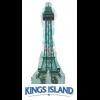
September 27, 201114 yr http://espn.go.com/espn/page2/story/_/id/7023615/tmq-says-history-being-made-detroit-lions-buffalo-bills-rise Scroll down, it's near the bottom. Picture caption is hilarious.
September 27, 201114 yr Haha! I'm not thrilled that they say it's 'the park's star thrill ride," but the caption is indeed funny. I'm just glad we didn't get a 300 foot StarFlyer. It might not have opened yet!
September 27, 201114 yr Ugh Kings Island, not King's Island. Why does that irk me so bad? Same here man, same here. It is Kings Island, saying the plural of "King". King is not the name of a person, so it is not supposed to show ownership....not King's Island!





Join the conversation
You can post now and register later. If you have an account, sign in now to post with your account.
Note: Your post will require moderator approval before it will be visible.